
"I'm going to China — which apps should I install?"
I live in Shenzhen, and this is one of the questions I get asked most. It's also one of the hardest to answer, because many of the apps you use every day at home don't work in China 😅
Google Maps is unreliable, WhatsApp and Instagram are blocked, and your usual restaurant-review apps barely cover China. Arrive without the right replacements and you'll hit the triple whammy: you can't pay, can't find your way, and can't read the menu.
So here are the 10 apps worth installing before your China trip, each with an "essential" rating. Use it as your pre-trip checklist 📱

🚨 Rule #1: install your apps before you leave home
The most important advice first: install and set up every app at home. Three reasons:
| Reason | What happens otherwise |
|---|---|
| 🤖 Google Play doesn't work in China | Android users can't download apps once they arrive |
| 📩 Sign-up needs SMS codes | Codes go to your home number — easiest to receive while you're at home |
| 💳 Card linking can fail | If your card is declined, you can call your bank more easily from home |
On iPhone, the App Store works in China — but when you first land, you may not have data yet. Install everything at least a week before you fly, and log in once to check 👍
① Alipay (支付宝) — for paying for everything [★★★]
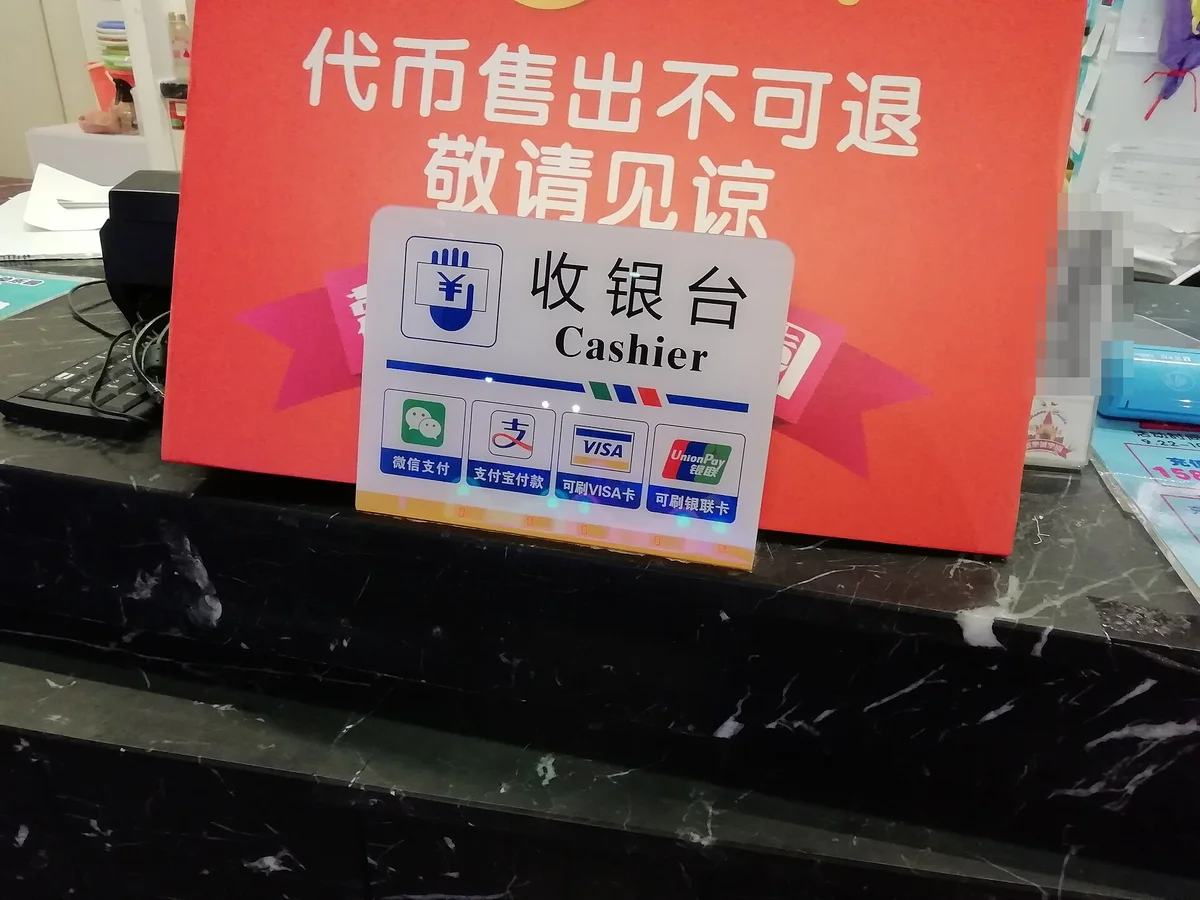
Use it for: shop payments, the metro, taxis, shared bikes — even translation
If you could install only one app, this is it.
China is overwhelmingly cashless, and even street stalls take QR payments. Foreigners can now create an account with their home phone number and link a Visa or Mastercard — no Chinese bank account needed.
Alipay's real power is the mini-apps built into it: metro QR codes, DiDi taxis, shared bikes, restaurant QR ordering, translation and more.
💡 Setup and card linking: How to Use Alipay in China as a Foreigner.
② WeChat (微信) — messaging, plus WeChat Pay as backup [★★★]
Use it for: messaging people in China, WeChat Pay, mini-programs
WeChat is China's WhatsApp. Since WhatsApp is blocked, hotels, tour guides and people you meet will contact you on WeChat.
It's also your second payment method, WeChat Pay (微信支付) — a backup for when Alipay doesn't work. Payment screens almost always offer both "微信支付" and "支付宝".
WeChat is harder to set up than Alipay, though: during sign-up you may be asked to have an existing WeChat user scan a QR code to verify you. If you know someone who uses WeChat, ask them before you go.
💡 Sign-up, verification and card linking: How to Set Up WeChat Pay as a Foreigner.
③ Amap Global (高德地图) — instead of Google Maps [★★★]
Use it for: maps, walking directions, metro and bus routes
Google Maps barely works in China — it's blocked, and even with a workaround your location is offset from the map.
Use China's go-to map app, Gaode (Amap), instead. The English version, "Amap Global", is in your home app store, and metro, bus and walking directions work without logging in. Metro directions even tell you which exit to use 🚇
💡 iPhone users: Apple Maps also works normally in China (it uses Gaode's data there). For setup and a cheat sheet of Chinese buttons, see Amap (Gaode Maps) Guide for Foreigners.
④ Trip.com — hotels, trains and flights [★★★]

Use it for: hotels, high-speed rail tickets, domestic flights
Trip.com is the international arm of China's biggest travel company, Ctrip. It works in English and takes foreign cards, so it can handle almost all your bookings.
Hotels matter most: some hotels in China can't accept foreign guests. International booking sites like Trip.com generally list ones that can, so you avoid arriving to find you can't stay 🏨
Book high-speed trains on Trip.com and on the day you just scan your passport at the gate.
💡 See How to Book China High-Speed Train Tickets on Trip.com and Can Foreigners Stay at Any Hotel in China?.
⑤ NIA 12367 — online arrival card [★★☆]
Use it for: submitting your arrival card before you fly
This is the official app of China's National Immigration Administration. Since November 2025, foreign visitors can submit their arrival card online before arriving, so there's no paper form to fill in on the plane ✈️
You can also do it via a WeChat or Alipay mini-program (search "移民局12367") or the NIA website, so the app itself isn't strictly necessary — hence two stars. Still, do the arrival card before you fly.
💡 What happens at the airport: Arriving in China: Immigration, Fingerprints, Arrival Card and Customs.
⑥ An offline translation app — your no-signal backup [★★☆]
Use it for: menus, signs and talking to staff
Google Translate doesn't open in China without a workaround. Handily, Alipay has a built-in translation feature, which is enough when you're online.
But you also want something that works offline:
- 📱 iPhone: download Chinese for offline use in Apple's built-in Translate app
- 🤖 Android: download Chinese (Simplified) for offline use in Google Translate
You must download these at home — you can't get them once you're in China. People forget this all the time ⚠️
⑦ Dianping (大众点评) — finding good restaurants [★★☆]

Use it for: finding restaurants, checking ratings and reviews
Dianping is China's Yelp. International review sites have little coverage of Chinese restaurants, so if you want to find good food in China, this is the app.
On iPhone, search "大众点评" in the App Store. On Android, using it as a WeChat mini-program is the easiest route. You don't need an account just to browse: check the rating (4.0+ out of 5 is a safe bet) and "人均" (average spend per person) and you can pick places even without reading Chinese. The app is in Chinese only, so a screenshot-and-translate habit helps.
⑧ Xiaohongshu (小红书 / RED) — trip inspiration [★☆☆]
Use it for: real-world tips on sights, cafés and food
Think of it as China's Instagram meets Pinterest. Young Chinese travelers open it first when planning a trip. It's full of photo posts, so you get the idea even without reading Chinese 📸
Search a city name plus "café", or a landmark name, and you'll find spots no guidebook covers. Great for planning.
Using it fully often needs an account, and it's mostly in Chinese, so treat it as a fun extra if you have time.
⑨ A way around the "Great Firewall" — for Google, WhatsApp and Instagram [★★☆]
Use it for: WhatsApp, Instagram, Google, YouTube, etc.
Google, WhatsApp, Instagram, Facebook and YouTube are blocked in China. If you want to message family on WhatsApp or check Gmail, you need a plan.
There are two main approaches:
- 📶 International roaming from your home carrier, or a travel eSIM: these connections usually route outside mainland China's filtering, so blocked apps often work as normal
- 🛡️ A VPN app: a backup for when you're on hotel or café Wi-Fi
If you go the VPN route, choose one with a track record of working in China, and sign up, install and test it before you leave — VPN websites are often unreachable from inside China. Using a VPN in China sits in a legal gray area; in practice visitors use them widely, but it's your own call.
⑩ Railway 12306 — the official train app [★☆☆]
Use it for: buying train tickets directly from China Railway
China Railway's official ticketing app. You can register with a passport and pay with Alipay or WeChat Pay, and since it's official there's no booking fee like Trip.com's 🚄
The trade-off is a less forgiving interface, and identity verification can trip you up. For a first trip, Trip.com is plenty. Consider 12306 your "next step" once you're a regular.
🙅 Apps you don't need — Alipay already does it
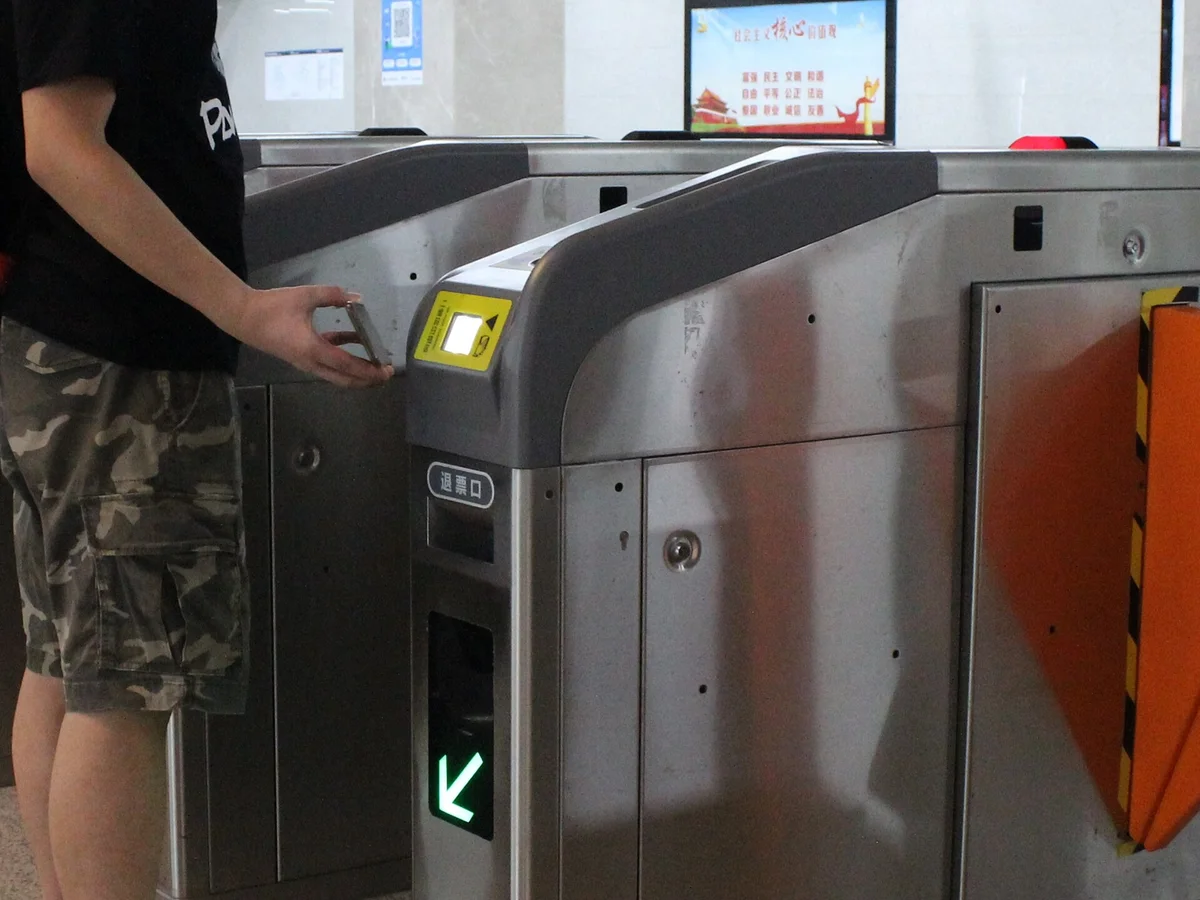
"Should I install the DiDi app too?" — as a visitor, you don't need separate apps for these. They all work as mini-apps inside Alipay:
| What you want to do | Standalone app | Easiest for visitors |
|---|---|---|
| 🚕 Get a taxi | DiDi (滴滴出行) | Search "DIDI" in Alipay |
| 🚇 Ride the metro or bus | Each city's metro app | Alipay "出行" (Transport) QR code |
| 🚲 Shared bikes | Hellobike, etc. | Scan the blue bike with Alipay |
| 🍜 Order at restaurants | — | Scan the table QR code with Alipay |
| 🔋 Rent a power bank | — | Scan the kiosk QR code with Alipay |
Standalone apps sometimes ask for a Chinese phone number or ID, and foreigners get stuck halfway. Through Alipay, your existing account just works.
💡 Step-by-step guides: DiDi · the metro · restaurant QR ordering.
📋 Pre-departure checklist
Screenshot this table so nothing slips through 📸
| # | App | Rating | Do this before you leave |
|---|---|---|---|
| ① | Alipay (支付宝) | ★★★ | Sign up + link your card |
| ② | WeChat (微信) | ★★★ | Sign up + enable WeChat Pay (may need a friend to verify) |
| ③ | Amap Global (高德地图) | ★★★ | Install + check language |
| ④ | Trip.com | ★★★ | Book hotels and trains |
| ⑤ | NIA 12367 | ★★☆ | Submit your online arrival card |
| ⑥ | Translation app | ★★☆ | Download Chinese for offline use |
| ⑦ | Dianping | ★★☆ | Install (iPhone) |
| ⑧ | Xiaohongshu | ★☆☆ | If you have time |
| ⑨ | Roaming / eSIM / VPN | ★★☆ | Set up + test it |
| ⑩ | Railway 12306 | ★☆☆ | For regulars; Trip.com is fine for a first trip |
❓ FAQ
Q. Do these apps work without a Chinese phone number? 📞 A. The apps here were chosen because you can sign up with a foreign number. Some Chinese services do require a Chinese number — if you hit one, check whether the same thing is available inside Alipay.
Q. Are the apps in English? 🈶 A. Alipay, WeChat and Trip.com work in English. Amap has its English version, Amap Global. Dianping, Xiaohongshu and parts of 12306 are mostly Chinese — a translation app helps.
Q. I'm short on phone storage 📦 A. At a bare minimum, Alipay, WeChat, Amap Global and Trip.com are enough. Taxis and the metro run inside Alipay, so you need fewer apps than you'd think.
Q. Which of my usual apps will still work? 📱 A. Apple Maps and Apple's Translate app work in China. Google, WhatsApp, Instagram and Facebook won't, unless you use roaming, a travel eSIM or a VPN.
✅ Summary
- 💳 Alipay comes first — payments, metro and taxis, almost all in one app
- 💬 WeChat for messaging and backup payments — set it up early in case you need friend verification
- 🗺️ Use Amap Global, not Google Maps — it even tells you the metro exit
- 🏨 Book on Trip.com — hotels that accept foreigners, and train tickets
- 📴 Download offline translation before you go
- 🙅 Skip the separate DiDi, bike and metro apps — Alipay covers them
- 🏠 Install and log in to everything at home
Get this done and most of the "help!" moments on a China trip simply won't happen. Have a great trip 🇨🇳
📚 Read next
- How to Use Alipay in China as a Foreigner — your number one app, set up step by step with screenshots
- Arriving in China: Immigration, Fingerprints, Arrival Card and Customs — what happens when you land
- How to Ride the Metro in China — put Alipay to work on day one
Information current as of October 2026. App features and support for foreign users change often — check each app for the latest.
Image credits: Wikimedia Commons — Futian, Shenzhen: Shihu7 (CC BY-SA 4.0) / payment signs: Shwangtianyuan (CC BY-SA 4.0) / Shenzhen North Station: Percival Kestreltail (CC BY-SA 4.0) / Shenzhen restaurant street: MACAHWM Bewizo Hom (CC0) / metro QR gate: Painjet (CC BY-SA 4.0)